ITX slashes project timeline and cost by 50% to preserve client’s vital revenue stream.
This research post describes in detail how a second ITX project team – with an assist from AI – worked in parallel with their colleagues to revitalize a legacy platform modernization project. Through extensive experimentation and testing, the team used GitHub Copilot’s AI-assisted IDE (Integrated Development Environment) tool to complete 7 months’ worth of roadmap in fewer than 4 months.
Observations: The Client and Their Challenge
Our client is a non-profit organization committed to helping students plan for future success in post-secondary academics and beyond. They reached out to ITX to help modernize their aging online portal – a critical project. Failure to develop, test, and release the new platform in time for their annual selling cycle and busy onboarding period threatened a vital revenue stream.
Standing in their way was an aging monolith platform that struggled with all the fundamental hurdles that hinder organizational progress and efficiency:
- Scalability issues that adversely affect performance
- Maintenance challenges that increase costs and risk of error
- System incompatibility with more modern technologies
- Deployment difficulties, leading to disruptions and downtime
- Accumulation of tech debt, making future enhancements more difficult and costly
The challenge of the looming deadline was only exacerbated by the size and complexity of the client’s legacy platform and by the client’s requirement that we retain its original system design. To ensure the project’s timely completion, the project team needed to boost its current velocity to deliver the remaining product backlog on time.
Fortunately, ITX’s recent experimentation with GitHub Copilot offered a viable pathway to deliver a successful business outcome.
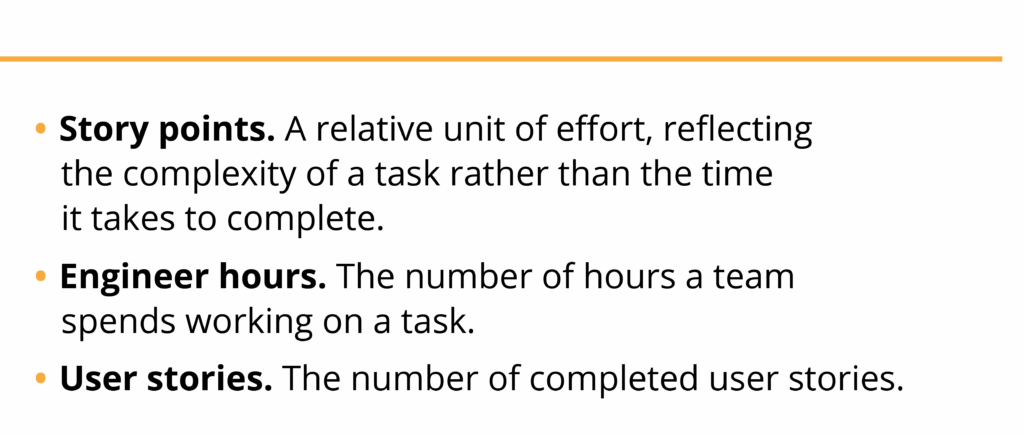
NOTE: Development team velocity measures the amount of work a team can complete within a specific timeframe. Knowing your team velocity helps in planning sprints and predicting future output. Team velocity is a key metric in Agile methodologies like Scrum, used to track performance and improve processes.
ITX developers, well trained in the use of GitHub Copilot AI, incorporated the code completion tool into their workflows, integrating it directly with code editors like Visual Studio to offer real-time code suggestions.
Hypothesis: Integrating AI into our workflows will compress the project timeline and reduce cost
Results from earlier project team experiments with these AI tools showed that integrating them into our workflows could significantly streamline development and enhance overall efficiency.
We further believed that by spinning up a second team to work in parallel with the existing project team, we would be able to boost overall velocity and reduce the number of sprints required to complete the project.
Experimentation
Before launching the experiment, ITX discussed the notion of integrating AI into our workflows with our client. This is not only an industry best practice, but it is also embedded in ITX’s policy-driven way of working. Once fully briefed, the client approved the use of the Copilot AI tools.
The team’s approach included the following steps:
- Spin up and deploy a second team to work in parallel with the existing dev team. The second team was already well trained in the use of AI tools, especially GitHub Copilot.
- Leverage the AI tools to accelerate coding outputs – i.e., generate code snippets, perform unit testing, and execute code refactoring (as needed) to improve our delivery time and overall quality.
- Tackle the product backlog one epic at a time; assign a total of three epics to the second project team.
- Update project plan estimates; we calculated that completion of the three epics would require 10 sprints spread over 5 months.
Performance metrics
Findings and Results
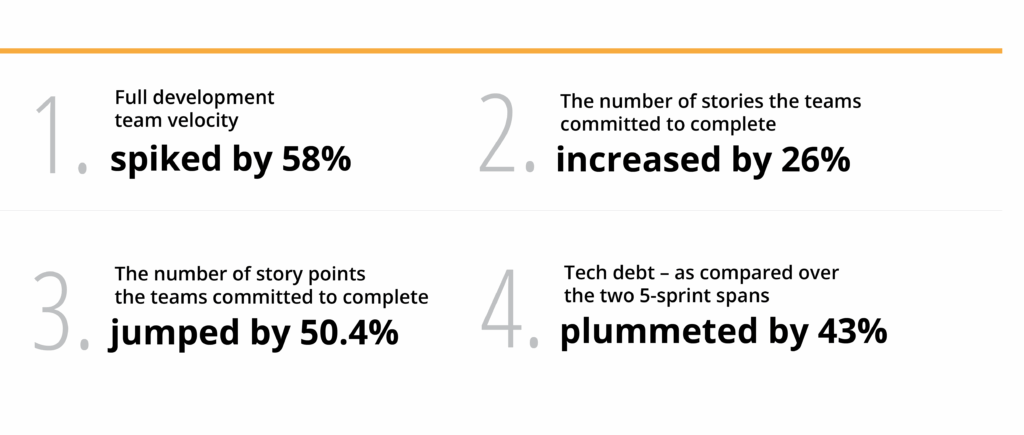
When we compared team performance over two, 5-sprint time spans – pre- and post-AI integration – we observed the following: the integration of GitHub Copilot into our workflow produced the following positive outcomes:
Recommendations
The primary objective for any experiment is learning. We gathered the following recommendations, thanks to the learning generated through this experiment:
Provide coaching support. Some team members found the Copilot learning curve to be steep – especially in terms of prompt writing. Going forward, ITX teams will include coaching resources to support team members who are new to the tool. The investment will not only enhance our efficiency, but it will also avoid feelings of frustration and the risk members deciding not to take advantage of Copilot’s capabilities.
Use Copilot AI from the start. Next time, we will launch the project using Copilot. This will help to avoid the challenges that arise when deploying the tool mid-project when development approaches and solutioning are already in place. In this instance, we deployed Copilot AI only after discovering that project success was not assured.
Generate documentation. Copilot is extremely effective in generating your functional definition of the source code – i.e., specific implementation details of functions, methods, or classes within the codebase. Just be sure to enter the proper references.
Build software with unit testing in mind. The push to “shift left” – i.e., embedding a quality assurance mindset as early as possible in the development process – helps teams prepare their code for unit testing in a modular way, so as to avoid refactoring. Copilot performs unit testing, which increases your coverage automatically. Caveat: to achieve this, be sure to code using proper patterns.
A human in the room. Copilot will not generate perfect code; you’ll need to adapt it for your solution. That is why, at ITX, a human decisionmaker remains in control when integrating AI tools into our workflows.
Security-focused. For ITX, Github proved to be the AI tool best suited for this project. When evaluating tools for adoption, we begin the process by considering – and balancing – a hierarchy of constraints: organizational, technical, and team needs.
NOTE: In terms of security, no code is loaded into Github; nor does Github expose client information.
Conclusion
With the assistance of GitHub Copilot, our AI-assisted project team was able to jump in to help revitalize a legacy modernization project confronting a significant backlog and tight deadline. As a result, we completed 7 months’ worth of roadmap in fewer than 4 months.
- Streamlined Development. We were pleased with Copilot’s ability to automate repetitive tasks, suggest code snippets, and provide guidance on best practices. ITX expertise in leveraging these capabilities helped to accelerate our development process by 50%.
- Enhanced Code Quality. More seasoned developers enjoyed considerable experience using Copilot, and we continue to be pleased with the tool’s ability to make suggestions that improve the quality of our code, leading to fewer bugs and better performance.
- Learning and Growth. Add “learning tool” to Copilot’s capabilities; our developers quickly came to understand new code patterns and technologies.

Peter Sullivan is Producer of ITX’s Product Momentum podcast and a student of Product and Design processes that work. As ITX’s Marketing Content Lead, he spearheads our efforts to deliver thought leadership that helps Product makers and UX designers understand and shape the future.


